Che scalability
Scaling cloud development environments (CDEs) to thousands of concurrent workspaces imposes high infrastructure demands on etcd storage, Operator memory, and worker node capacity. This topic covers the bottlenecks, tested maximums, and architectural patterns — including multi-cluster deployments — that address these challenges.
Such a scale imposes high infrastructure demands and introduces potential bottlenecks that can impact performance and stability. Addressing these challenges requires meticulous planning, strategic architectural choices, monitoring, and continuous optimization.
CDE workloads are particularly complex to scale. The underlying IDE solutions, such as Visual Studio Code - Open Source ("Code - OSS") or JetBrains Gateway, are designed as single-user applications, not as multitenant services.
Resource quantity and object maximums
While there is no strict limit on the number of resources in a Kubernetes cluster, there are certain considerations for large clusters to remember.
OpenShift Container Platform, a certified distribution of Kubernetes, provides a set of tested maximums for various resources. These maximums can serve as an initial guideline for planning your environment:
| Resource type | Tested maximum |
|---|---|
Number of nodes |
2000 |
Number of pods |
150000 |
Number of pods per node |
2500 |
Number of namespace |
10000 |
Number of services |
10000 |
Number of secrets |
80000 |
Number of config maps |
90000 |
For more details on OpenShift Container Platform tested object maximums, see the OpenShift Container Platform scalability and performance documentation.
For example, it is generally not recommended to have more than 10,000 namespaces due to potential performance and management overhead. In Eclipse Che, each user is allocated a namespace. If you expect the user base to be large, consider spreading workloads across multiple "fit-for-purpose" clusters and potentially using solutions for multi-cluster orchestration.
Resource requirements
When deploying Eclipse Che on Kubernetes, accurately calculate the resource requirements for each CDE, including memory and CPU or GPU needs. This determines the right sizing of the cluster. In general, the CDE size is limited by and cannot be bigger than the worker node size.
The resource requirements for CDEs can vary significantly based on the specific workloads and configurations. A simple CDE might require only a few hundred megabytes of memory. A more complex one might need several gigabytes of memory and multiple CPU cores.
|
You can find more details about calculating resource requirements in the official documentation. |
Using etcd
The primary datastore of Kubernetes cluster configuration and state is etcd. It holds information about nodes, pods, services, and custom resources.
As a distributed key-value store, etcd does not scale well past a certain threshold. As the size of etcd grows, so does the load on the cluster, risking its stability.
|
The default etcd size is 2 GB, and the recommended maximum is 8 GB. Exceeding the maximum limit can make the Kubernetes cluster unstable and unresponsive. Even though the data stored in a |
Object size as a factor
The size of the objects stored in etcd is also a critical factor. Each object consumes space, and as the number of objects increases, the overall size of etcd grows. The larger the object, the more space it takes. For example, etcd can be overloaded with only a few thousand large Kubernetes objects.
In the context of Eclipse Che, by default the Operator creates and manages the 'ca-certs-merged' ConfigMap, which contains the Certificate Authorities (CAs) bundle, in every user namespace. With a large number of Transport Layer Security (TLS) certificates in the cluster, this results in additional etcd usage.
To disable mounting the CA bundle by using the ConfigMap under the /etc/pki/ca-trust/extracted/pem path, configure the CheCluster Custom Resource by setting the disableWorkspaceCaBundleMount property to true. With this configuration, only custom certificates are mounted under the path /public-certs:
spec:
  devEnvironments:
    trustedCerts:
      disableWorkspaceCaBundleMount: true
DevWorkspace objects
For large Kubernetes deployments, particularly those involving a high number of custom resources such as DevWorkspace objects, which represent CDEs, etcd can become a significant performance bottleneck.
|
Based on the load testing for 6,000 |
Starting from DevWorkspace Operator version 0.34.0, you can configure a pruner that automatically cleans up DevWorkspace objects that were not in use for a certain period of time. To set the pruner up, configure the DevWorkspaceOperatorConfig object as follows:
apiVersion: controller.devfile.io/v1alpha1
kind: DevWorkspaceOperatorConfig
metadata:
  name: devworkspace-operator-config
  namespace: crw
config:
  workspace:
    cleanupCronJob:
      enabled: true
      dryRun: false
      retainTime: 2592000
schedule: “0 0 1 * *”- retainTime
-
By default, if a workspace was not started for more than 30 days, it is marked for deletion.
- schedule
-
By default, the pruner runs once per month.
OLMConfig
When an Operator is installed by the Operator Lifecycle Manager (OLM), a stripped-down copy of its CSV is created in every namespace the Operator watches. These “Copied CSVs” communicate which controllers are reconciling resource events in a given namespace.
On large clusters with hundreds or thousands of namespaces, Copied CSVs consume an unsustainable amount of resources, including OLM memory, etcd storage, and network bandwidth. To eliminate the CSVs copied to every namespace, configure the OLMConfig object:
apiVersion: operators.coreos.com/v1
kind: OLMConfig
metadata:
  name: cluster
spec:
  features:
    disableCopiedCSVs: true
Additional information about the disableCopiedCSVs feature is available in its original enhancement proposal.
In clusters with many namespaces and cluster-wide Operators, Copied CSVs increase etcd storage usage and memory consumption. Disabling Copied CSVs significantly reduces the data stored in etcd and improves cluster performance and stability.
Disabling Copied CSVs also reduces the memory footprint of OLM, as it no longer maintains these additional resources.
For more details about disabling Copied CSVs, see the OLM documentation.
Cluster Autoscaling
Although cluster autoscaling is a powerful Kubernetes feature, you cannot always rely on it. Consider predictive scaling by analyzing load data to detect daily or weekly usage patterns.
If your workloads follow a pattern with dramatic peaks throughout the day, provision worker nodes accordingly. For example, if workspaces increase during business hours and decrease during off-hours, predictive scaling adjusts the number of worker nodes. This ensures enough resources are available during peak load while minimizing costs during off-peak hours.
You can also use open-source solutions such as Karpenter for configuration and lifecycle management of the worker nodes. Karpenter can dynamically provision and optimize worker nodes based on the specific requirements of the workloads. This helps improve resource utilization and reduce costs.
Multi-cluster
By design, Eclipse Che is not multi-cluster aware. You can only have one instance per cluster.
However, you can run Eclipse Che in a multi-cluster environment by deploying Eclipse Che in each cluster. Use a load balancer or Domain Name System (DNS)-based routing to direct traffic to the appropriate instance. This approach distributes the workload across clusters and provides redundancy in case of cluster failures.
Developer Sandbox example
You can test running Che in a multi-cluster environment by using the Developer Sandbox, a free trial environment by Red Hat.
From an infrastructure perspective, the Developer Sandbox consists of multiple Red Hat OpenShift Service on AWS (ROSA) clusters. On each cluster, the productized version of Eclipse Che is installed and configured using Argo CD. The workspaces.openshift.com URL is used as a single entry point to the Eclipse Che instances across clusters.
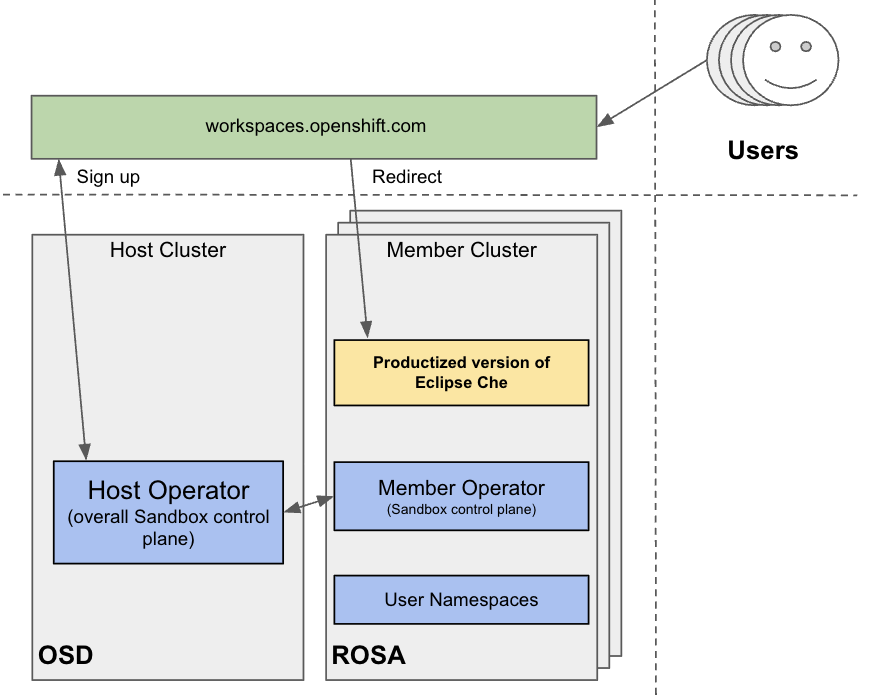
You can find implementation details about the multicluster redirector in the crw-multicluster-redirector GitHub repository.
|
The multi-cluster architecture of workspaces.openshift.com is part of the Developer Sandbox. It is a Developer Sandbox-specific solution that cannot be reused as-is in other environments. However, you can use it as a reference for implementing a similar solution well-tailored to your specific multicluster needs. |
The multicluster redirector solution for OpenShift Container Platform
Red Hat offers an open-source, Quarkus-based service that acts as a single gateway for developers. This service automatically redirects users to the correct Eclipse Che instance on the appropriate cluster based on their OpenShift Container Platform group membership. The community-supported version is available in the devspaces-multicluster-redirector GitHub repository.
Architecture and requirements
A critical requirement for the multicluster redirector is that all users are provisioned to the host cluster where the redirector is deployed. Users authenticate through the OAuth flow of this cluster, even if they never run workloads there. The host cluster’s OpenShift Container Platform groups determine the routing logic. See the devspaces-multicluster-redirector documentation for deployment instructions.
Configuration
The routing configuration uses a ConfigMap that contains JSON to map OpenShift Container Platform groups to Eclipse Che URLs. The redirector uses this file to update routing tables in real-time without requiring restarts.
Operational flow
The routing process follows these steps:
-
Authenticate by using OAuth through a proxy sidecar.
-
Pass identity and group information through HTTP headers.
-
Verify group memberships by using OpenShift Container Platform API queries.
-
Determine the appropriate Eclipse Che URL by using a mapping lookup.
-
Redirect the user to the designated cluster instance.
If users belong to multiple OpenShift Container Platform groups, they can choose their desired Eclipse Che instance from a selection dashboard.